
Creative professionals have a complicated relationship with new technology. Tools that save time and unlock new possibilities are genuinely exciting, but the hype cycle around AI has been so intense that many editors and designers have developed a healthy skepticism toward any product claiming to revolutionize their workflow. That skepticism makes the platforms earning genuine, sustained adoption among working professionals particularly worth paying attention to.
The Features That Set Runway AI Apart
In a crowded market of AI-powered creative applications, certain platforms distinguish themselves through a combination of model quality and thoughtful interface design. Runway AI has built a loyal following by consistently pushing the boundaries of what generative video can accomplish, and Pollo AI’s comparison resources help users understand where it fits in the broader landscape. The platform’s core advantage lies in its ability to translate complex machine learning operations into visual workflows that make sense to editors and motion graphics artists. Rather than requiring users to understand diffusion models or latent spaces, Runway AI presents tools like inpainting, motion tracking, and style transfer as simple, brush-based interactions on a familiar timeline.
The green screen replacement feature alone has changed how low-budget productions approach compositing. Instead of lighting a green screen evenly and dealing with spill, creators can shoot against any background and let the AI handle subject isolation. For YouTube creators and indie filmmakers without access to proper soundstages, this single capability justifies the subscription cost. Pollo AI provides detailed breakdowns of how Runway AI’s features compare to other generation tools, which is helpful for creators trying to decide where to invest their money and learning time.

Real-Time Previews and Iteration Speed
One of the most underrated aspects of any creative tool is how quickly you can see the results of a change and try again. Platforms that force a queue-based rendering process — where you submit a job and wait minutes for output — break the creative flow entirely. Runway AI invested early in making previews fast enough that iterating on a look feels conversational rather than transactional.
That speed changes how creators actually use the tool. They experiment more freely, try variations they might otherwise skip, and end up with better results because the cost of exploration is low. It’s a design philosophy that mirrors what professional editors already expect from tools like After Effects or DaVinci Resolve, where real-time feedback is the baseline. Bringing that same responsiveness to AI-powered generation is a meaningful step toward making these tools feel like natural extensions of an existing workflow rather than awkward add-ons.
Generative Video Beyond the Hype Cycle
The conversation around AI video has matured past the “look what this can do” phase into practical discussions about where it fits in actual production pipelines. Concept artists use generative video to pitch visual directions before committing to full shoots. Editors use it to generate placeholder B-roll that sometimes ends up in the final cut because it works well enough. Indie game developers generate environmental backgrounds and atmospheric elements that would otherwise require expensive stock footage licenses.
This shift from spectacle to utility is where the real value lies. A tool that produces jaw-dropping demos but doesn’t integrate into daily work is ultimately a toy. The platforms gaining traction are the ones solving mundane but persistent problems — like the B-roll challenge that has plagued video creators for years.
B-roll has always been a pain point. Shooting it takes time, stock footage costs money, and finding the right clip in a library can consume more editing hours than anyone wants to admit. Text-to-video generation is solving this for a growing number of use cases, particularly for abstract concepts, atmospheric shots, and transitional sequences where literal photorealism isn’t the primary goal. Pollo AI’s own text-to-video tools address this same need, giving creators another avenue for generating supplementary footage without leaving the platform.
How CapCut Fits Into the Creator Toolkit
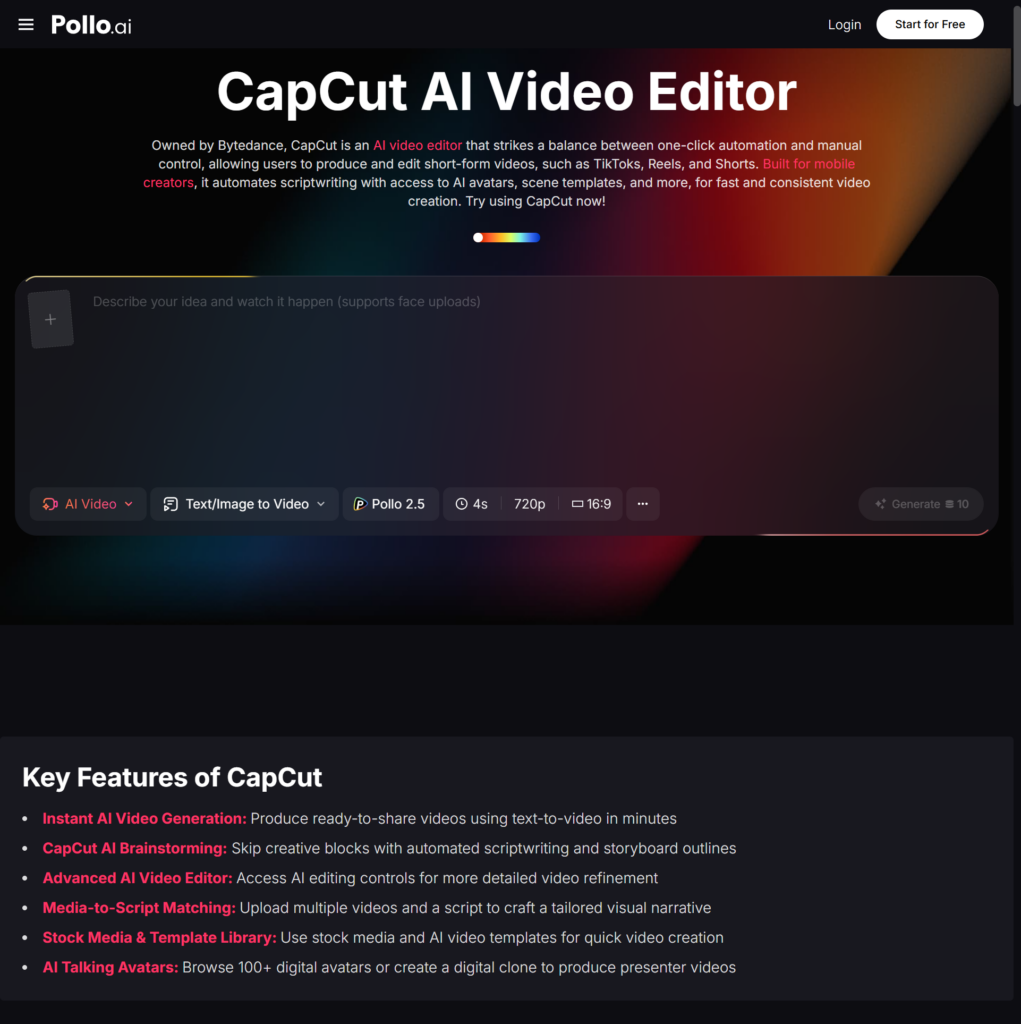
On the other end of the spectrum from professional-grade generative tools sits CapCut, which has taken a completely different route to market dominance. Owned by ByteDance, CapCut has become wildly popular among social media creators by offering a free, template-driven editing experience that integrates seamlessly with TikTok. Its strength isn’t in raw generative power but in removing friction from the editing process for short-form vertical video. Pollo AI users often explore how CapCut fits alongside more advanced AI generation tools, since many creators end up using both — one for heavy generative lifting and the other for quick social media edits.
CapCut’s auto-captioning, trending template library, and one-tap publishing make it the fastest path from raw footage to a finished social post for creators who prioritize speed over granular control. The template ecosystem deserves particular attention here. Trending templates drive millions of views on TikTok, and CapCut makes it trivially easy to plug your own clips into formats already proven to perform. For creators chasing viral reach, this feature alone is more valuable than any generative capability.
That said, CapCut’s limitations become apparent when you need to do anything beyond assembling and formatting existing footage. It’s not designed for generating new visual content from scratch, which is exactly where tools like Runway AI and Pollo AI fill the gap.
Choosing Between Power and Convenience
Most creators don’t have to make an either-or choice. A growing number of professionals use Runway AI or Pollo AI for heavy generative work, then bring those assets into CapCut for final assembly and platform-native formatting. This hybrid workflow captures the strengths of both approaches while accepting that no single tool is optimal for every stage of the creative process.
The creator who generates atmospheric B-roll in Pollo AI, composites it with live footage using Runway AI’s masking tools, and then drops the final cut into CapCut for captioning and TikTok-optimized export is using each tool where it’s strongest. That kind of intentional workflow design is more effective than searching for the one platform that does everything adequately but nothing exceptionally well.
What to Prioritize When Choosing a Video AI Tool
The tool that impresses in a demo isn’t always the tool that fits into a daily workflow. Evaluating a platform based on how well it handles the tasks you actually perform every week — not the flashy features you might use once a quarter — leads to better decisions. Render speed, export format flexibility, and integration with existing editing software matter more in practice than having the absolute highest-fidelity generation if that generation takes ten minutes per clip.
Start by auditing your own workflow. Where do you lose the most time? Where do you compromise on quality because the alternative is too expensive or too slow? The right AI video tool is the one that addresses those specific bottlenecks. For some creators, that’s Runway AI’s generative depth. For others, it’s CapCut’s frictionless speed. For many, it’s a combination of tools — with platforms like Pollo AI serving as a hub that connects the capabilities of multiple AI engines in one accessible place.
The creators who thrive in this new landscape won’t be the ones who pick a single tool and commit to it religiously. They’ll be the ones who understand what each tool does best and build workflows that play to those strengths.